
Quality Standards Workflow
e-SMART ISO
Digitizing ISO Management Systems for the Modern Era
Magic Software (Thailand) Co., Ltd. Has developed the e-SMART ISO software to upgrade ISO standard management systems into a digital format. This solution helps reduce operational steps, minimize human error, and enhance efficiency in systematic quality document management.
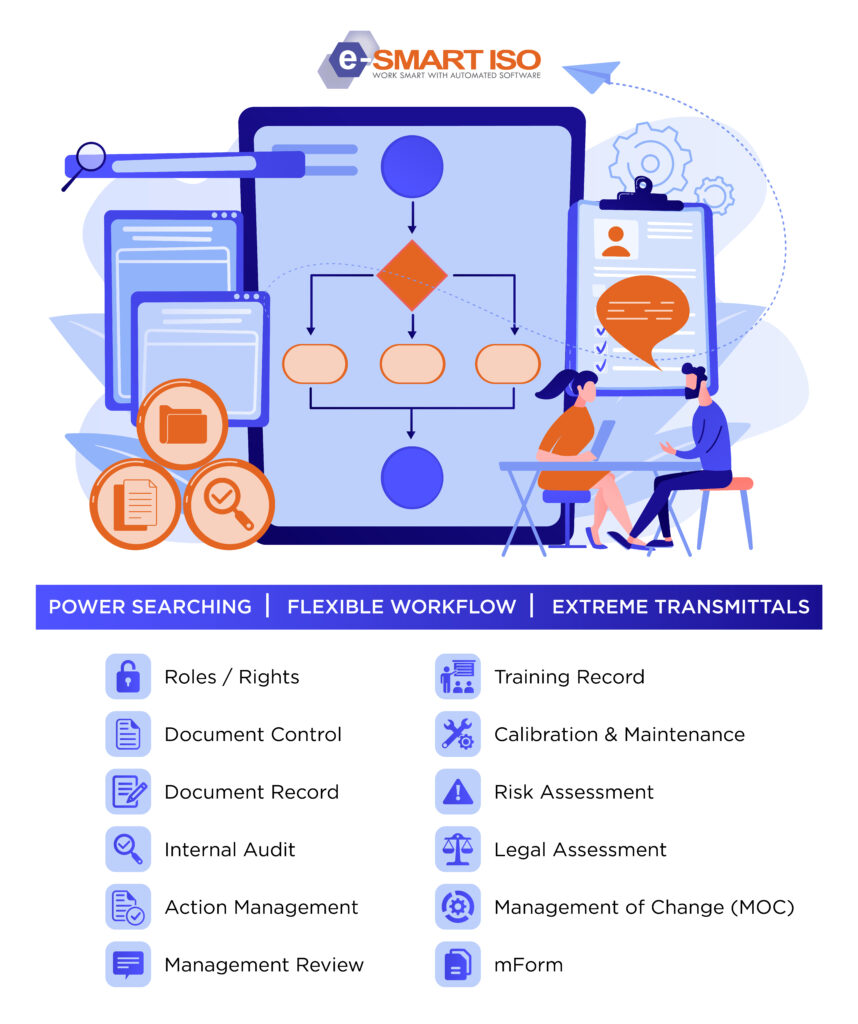
e-SMART ISO is a web-based system operating on a Microsoft database. It supports operations through an Electronic Workflow coupled with an email notification system, enabling rapid, accurate, and traceable approvals, status tracking, and document retrieval.
Through centralized data management, organizations can efficiently maintain their ISO standards while remaining fully equipped to support future expansion of certification scopes and organizational growth.
KEY BENEFITS

1. Strategic Benefits | Increase Management Efficiency
- Centralize ISO system data and management processes
- Track status and operational overview via Dashboard
- Support decision-making and support organizational growth
2. Operational Benefits | Rduce Steps, Increase Agility
- Reduce paperwork and redundant work steps
- Increase speed with Workflow and automatic notification system
- Access and search information conveniently from online system
3. Quality Benefits | Elevate Quality Control
- Control latest document versions, reduce risk from using obsolete documents
- Audit operational history backward
- Support ISO audit and continuous quality improvement
4. Financial Benefits | Reduce Costs, Increase Value
- Reduce paper usage and document storage space
- Reduce time in searching, tracking, and managing documents
- Increase resource efficiency and reduce workload in the long term
Module Functionality
Roles / Rights
- ISO Standards Setup: Define the standards used by the organization, such as ISO 9001, ISO 14001, ISO 45001, IATF 16949, etc.
- Organization Management: Establish department structures, business units, and user groups tailored to the organization’s needs.
- Document Configuration: Define document types, such as Procedures, Work Instructions, and Forms, along with their running number formats (document numbering systems).
- Workflow Configuration: Configure authoring, review, and approval processes tailored to specific document types.
- Roles & Access Control: Define system privileges and document access control lists (ACL) based on user roles.
- Document Announcement: Specify distribution lists for document release announcements to ensure relevant departments and stakeholders are notified.
Document Control
- Document Workflow: Define steps for document creation, review, approval, and publication via an online system.
- Version Control: Automatically manage document versions, store previous versions, and audit modification history.
- Document Access Control: Define user access permissions for viewing, downloading, and printing documents based on user roles.
- Online Document Management: Search, view, and track document status online, supporting Microsoft Office and multimedia files.
- Document History & Audit Trail: Track access history, modifications, and actions taken at each stage of the document lifecycle.
- Document Retention: Define retention periods and manage obsolete documents, supporting audit trail capabilities.
- Expiry Notification: Manage documents with expiration dates (e.g., contracts) with a automated notification system according to scheduled timelines.
- mForm Integration: Connect forms from mForm to register them as controlled documents, set revisions, and control the publication of the latest form versions.
(Note: This function requires integration with the mForm Module)
Document Record
Record Workflow: Define steps for creation, verification, and approval of quality records according to organizational processes.
Latest Form Control: Control the use of the latest published forms to prevent recording data using obsolete forms.
Access Control: Define access permissions and manage quality records based on user roles.
Paperless & Easy Search: Store and search quality records through an online system, reducing paper usage.
mForm Integration: Link forms from mForm that have been registered in Document Control to fill in and record data online*.
CAR Management: Record non-conformities and create CAR (Corrective Action Request) items when issues are found from quality records, enabling systematic corrective action*.
(Note: This function requires integration with mForm Module and Action Management Module)
Internal Audit
Audit Planning & Workflow: Define audit steps and create an annual internal audit plan through the system.
Audit Scheduling & Alerts: Confirm, postpone, or adjust the audit schedule with history logging and automatic email notification reminders.
Audit Checklist: Create audit checklists and record evaluation results online.
Audit Monitoring: Conveniently track the status and progress of internal audits.
Audit Report: Summarize results and generate audit reports with automatic email notification.
Auditor Profile: Store and verify auditor profiles and qualification histories online.
CAR Integration: Record non-conformities and issue CARs (Corrective Action Requests) directly from audit results for immediate corrective action*.
(Note: This function requires integration with Action Management)
Action Management
- CAR Workflow: Define operational steps and approval workflows for corrective and preventive actions according to organizational processes.
- CAR Management: Create CAR requests via standard forms, with defined non-conformity types and corrective action items.
- Module Integration: Directly link CAR creation from Internal Audit, Management Review, and Document Record.
- Approval Notification: Send automatic email notifications for pending approvals, helping to reduce operational delays.
- Follow-up Alert: Send email alerts for corrective and preventive action follow-up schedules.
- CAR Tracking & Reporting: Track status, search information, and review corrective action reports online.
Management Review
Meeting Planning: Plan and schedule meeting appointments through the online system.
Attendance Management: Confirm meeting attendance, with history logging and verification of attendees.
Meeting Record: Record meeting outcomes and reports through the system in real-time. • MR Action Assignment: Assign tasks based on meeting resolutions (MR Action) to responsible personnel through the system.
Action Management Integration: Link meeting non-conformities to the Action Management Module for corrective action and follow-up*.
(Note: This function requires integration with Action Management)
Training Record
- Training Course Management: Define and manage training courses according to organizational needs.
- Job-Based Training: Assign training courses aligned with job positions and employee job descriptions.
- Training Planning & Approval: Prepare annual training plans with verification and approval workflows through the online system.
- Training Record: Record training results through the system in real-time.
- Training History: Store, search, and review training histories by both individual employee and course to support audit traceabilities.
Calibration & Maintenance
- Equipment Management: Store tool and equipment data, with online search and history verification capabilities.
- Calibration Planning: Plan tool calibration and verification, with customizable cycles as appropriate.
- Calibration Alert: Send notifications for scheduled calibration and verification, including overdue items.
- Maintenance Scheduling: Manage maintenance schedules with advance notifications before due dates.
- Calibration & Maintenance History: Record and review calibration, verification, and maintenance history for convenient audit traceability.
Risk Assessment
Risk Criteria & Scoring: Define risk assessment criteria according to standard procedures, including scoring levels for likelihood and impact.
Multi-Standard Assessment: Support multi-standard risk assessments in a single evaluation.
Data Import: Import activity data and operational steps to support risk assessment.
Risk Assessment Workflow: Define risk assessment steps and risk management planning workflows through the system.
Risk Management Plan: Create risk management plans based on assessment results, track status, and attach reference documents or links.
Risk Monitoring & Reporting: Track status, review assessment history for each activity, and access evaluation reports online.
Legal Assessment
- Legal Register Management: Create and update the legal register, with online search capabilities for relevant legal information.
- Legal Workflow: Define steps and responsible persons for legal registration and compliance evaluation.
- Compliance & Risk Assessment: Evaluate relevance, compliance, and risk according to legal requirements, supporting multi-level evaluations such as legal level, section level, and operational task level (To-do List).
- Assessment Monitoring & Alert: Track evaluation status with alerts when re-evaluation cycles for compliance are due.
- Action Plan Management: Create corrective and preventive action plans in case of non-compliance, with assigned responsible persons and online progress tracking.
- Legal Compliance Reporting: Display legal register reports, compliance evaluation results, and risk summaries grouped by department, legal issue, and year.
Management of Change (MOC)
- MOC Workflow & Template: Define Management of Change (MOC) workflows and design templates to record details based on What, When, Where, Why, and How.
- Change Planning & Team: Define action plans, timelines, priority levels, responsible areas, and execution teams for each MOC.
- Checklist & Evaluation: Define pre- and post-change checklists along with measurable evaluation criteria.
- Access & Status Control: Set permissions for data recording and editing, while managing statuses such as Draft, In-Process, Approval, and Closed Out.
- MOC Dashboard & Master List: Display overview and compare task statuses via dashboards and graphs, with MOC Master List management.
- MOC History Log: Record and review historical activity logs for each step.
- Module Integration: Seamlessly link data with Risk Assessment, Legal Assessment, Document Control, and Action Plan modules for systematic reference and change tracking*.
(Note: Data linking functions require access permissions to the relevant modules)
mForm
Drag & Drop Form Builder: Easily create and design forms with Drag-and-Drop, customizing layouts and input fields as needed.
Smart Form: Support real-time automatic calculations and flexible multi-line tables for adding data items.
Flexible Workflow: Define workflows and approval chains, with control over data entry and editing conditions at each step.
Form Display & Menu: Customize data display formats and organize form menus to fit usage requirements. • Dashboard & Data Export: Display form data via dashboards and export data for further analysis or usage.
• Print Layout: Design form print layouts suitable for practical use.
• Document Control Integration: Link forms for registration, version control (Revision), and publication management via Document Control*.Document Record Integration: Utilize registered forms to fill in and record data online via Document Record*.
(Note: Integration functions require access permissions to the relevant modules)